AIOU 1431 Solved Assignment 2 Spring 2025

AIOU 1431 Basics of ICT Solved Assignment 2 Spring 2025


AIOU 1431 Assignment 2


Q1. What is meant by operating system? Elaborate its functions and responsibilities.(20 Marks)

What is an Operating System?

An Operating System (OS) is the core software of a computer system that acts as a bridge between the hardware and the user. It manages hardware resources, provides a platform for application software to run, and ensures smooth interaction between users and the machine. Essentially, it is the backbone that allows a computer to function efficiently.

Functions and Responsibilities of an Operating System

1. Resource Management:

- Manages the computer's hardware resources, such as the CPU, memory, disk drives, and peripherals.

- Allocates and deallocates resources as required by different programs or processes.

2. Process Management:

- Handles the execution of multiple processes by scheduling them efficiently.

- Provides multitasking capabilities and ensures that processes do not interfere with each other.

3. Memory Management:

- Tracks each byte of a system's memory and manages its allocation to various programs.

- Ensures that no two processes access the same memory space simultaneously, preventing conflicts.

4. File System Management:

- Manages the creation, reading, writing, and deletion of files.

- Provides hierarchical file structures, ensuring organized data storage.

5. Device Management:

- Controls and coordinates communication between the computer and input/output devices like printers, keyboards, and monitors.

- Uses device drivers to interface with different hardware components.

6. Security and Access Control:

- Protects the system from unauthorized access by implementing user authentication and permissions.

- Prevents malware or harmful programs from compromising system integrity.

7. User Interface (UI):

- Provides an interface for users to interact with the system, either through a graphical user interface (GUI) or a command-line interface (CLI).

8. Error Detection and Handling:

- Monitors and resolves errors in hardware or software to maintain system stability.

- Logs errors for debugging and troubleshooting.

9. Networking:

- Facilitates communication and data sharing between computers over a network.

- Manages internet connectivity and networking protocols.

10. System Performance Monitoring:

- Keeps track of system performance metrics such as CPU usage, memory usage, and application performance.

- Optimizes performance by reallocating resources as needed.

Examples of Operating Systems

- Desktop/Laptop OS: Windows, macOS, Linux.

- Mobile OS: Android, iOS.

- Server OS: Ubuntu Server, Windows Server.

- Embedded OS: Real-Time Operating Systems (RTOS) used in devices like ATMs or IoT devices.


Q2. What are the five components of data communication? Elaborate with the help of diagram.(20 Marks)

Five Components of Data Communication

1. Sender:

- The source of the data, which generates and initiates the communication.

- Examples include computers, smartphones, or IoT devices.

2. Receiver:

- The destination that receives and processes the transmitted data.

- Examples include another computer, server, or mobile device.

3. Message:

- The actual content of the communication, which could be text, audio, video, or other forms of data.

4. Transmission Medium:

- The physical or virtual pathway through which the message travels from the sender to the receiver.

- Examples include cables (e.g., fiber optic), radio waves, or wireless networks.

5. Protocol:

- The set of rules governing how data is transmitted and understood between sender and receiver.

- Examples include TCP/IP, HTTP, and FTP.


Data Communication Diagram

Data Communication Diagram

Q3. Explain the layers of OSI model in detail.(20 Marks)

Detailed Explanation of OSI Model Layers

The OSI (Open Systems Interconnection) Model is a conceptual framework that standardizes the functions of a communication system into seven distinct layers. It helps understand how data flows in a network and ensures interoperability between various technologies and devices.

1. Physical Layer
  • Purpose: Responsible for the physical transmission of raw data bits (0s and 1s) over the communication medium (e.g., cables, radio waves).
  • Functions:
    • Defines the hardware specifications for devices (e.g., cables, switches).
    • Handles signal modulation, transmission, and reception.
    • Ensures synchronization of bits.
  • Examples: Ethernet cables, fiber optics, Wi-Fi, Bluetooth.
2. Data Link Layer
  • Purpose: Ensures reliable data transfer between two directly connected devices by addressing error detection and correction.
  • Functions:
    • Organizes data into frames for transmission.
    • Handles physical addressing using MAC addresses.
    • Controls access to the shared medium.
  • Examples: MAC addresses, switches, network interface cards (NICs).
3. Network Layer
  • Purpose: Handles routing of data packets across interconnected networks and manages logical addressing.
  • Functions:
    • Implements IP addresses to identify devices.
    • Determines the best path for data transfer.
    • Handles packet fragmentation and reassembly.
  • Examples: Routers, IP protocol (IPv4/IPv6).
4. Transport Layer
  • Purpose: Ensures reliable delivery of data between applications by managing segmentation, flow control, and error recovery.
  • Functions:
    • Ensures end-to-end communication.
    • Handles data segmentation and reassembly.
    • Implements protocols like TCP (reliable) and UDP (unreliable).
  • Examples: TCP, UDP.
5. Session Layer
  • Purpose: Manages sessions between applications, controlling the initiation, maintenance, and termination of connections.
  • Functions:
    • Synchronizes communication between systems.
    • Establishes checkpoints for recovery in case of failures.
    • Provides dialog control for interactions.
  • Examples: APIs, NetBIOS.
6. Presentation Layer
  • Purpose: Handles the translation of data into a format that is understandable by the application layer, ensuring compatibility.
  • Functions:
    • Converts data between formats (e.g., encryption, compression, encoding).
    • Ensures proper data syntax and semantics.
  • Examples: JPEG, PNG, ASCII, SSL/TLS.
7. Application Layer
  • Purpose: Serves as the interface between the end-user and the network, allowing access to services.
  • Functions:
    • Provides application-specific services like email, file transfer, web browsing.
    • Facilitates network-related functions like DNS and HTTP/HTTPS.
  • Examples: Web browsers, email clients, FTP.

Q4. What is meant by Multimedia? Write some examples of multimedia applications in education and entertainment.(20 Marks)

What is Multimedia?

Multimedia refers to the integration of various types of media, such as text, images, audio, video, animations, and interactive content, into a single platform to deliver information or entertainment. It combines these elements to create a rich, engaging, and interactive user experience, often used for communication, learning, and entertainment purposes.

Examples of Multimedia Applications in Education

1. E-Learning Platforms: Interactive platforms like Khan Academy or Coursera that incorporate videos, animations, and quizzes to make learning engaging.

2. Educational Games: Gamified apps or games, such as "Duolingo" for language learning, use multimedia elements like sounds and visuals to keep users motivated.

3. Virtual Labs: Simulations that allow students to conduct experiments virtually with animations and interactive features, like PhET simulations.

4. Digital Presentations: Tools like Microsoft PowerPoint or Google Slides enhance classroom lessons with visuals, videos, and sound.

5. Augmented Reality (AR) and Virtual Reality (VR): Immersive technologies that simulate real-world environments for experiential learning, such as virtual field trips or medical training.

Examples of Multimedia Applications in Entertainment

1. Video Games: Games that combine high-quality graphics, sounds, and storytelling, like "The Legend of Zelda" or "FIFA."

2. Streaming Platforms: Services like Netflix, YouTube, and Spotify that deliver movies, music, and video content through multimedia integration.

3. Virtual Concerts: Live performances enhanced by virtual reality (VR) and 3D effects, providing an interactive experience.

4. Animated Films: Movies created using multimedia techniques, such as Pixar's animations that combine visuals, audio, and storytelling.

5. Theme Park Attractions: Immersive rides and shows, like 4D cinemas, using visual effects, soundscapes, and physical effects (e.g., wind or motion).


Q5. What is meant by Programming language? Differentiate between low level and high-level languages with the help of examples.(20 Marks)

A programming language is a set of rules and syntax that allows humans to write instructions for computers to follow. These instructions are used to create software, websites, apps, and other technological tools. Essentially, it serves as a bridge between human understanding and computer operations.
Programming languages come in different forms, such as high-level languages (like Python or Java) that are easy for humans to read and write, and low-level languages (like Assembly or Machine Code) that are closer to how computers actually process data.

1. Low-Level Languages
Definition: These are closer to machine language and hardware, providing little or no abstraction from the hardware. They require detailed instructions and are hard to learn and use. Characteristics:
  • Machine-dependent (specific to a particular hardware or processor).
  • Requires understanding of computer architecture.
  • Faster in execution since they directly interact with hardware.
  • Difficult to write, debug, and maintain.
Examples:
  • Machine Language: Consists of binary code (0s and 1s), like
    Code: 11010101 01100010.
  • Assembly Language: Uses mnemonics to represent machine instructions, e.g.,
    Code: MOV AX, 1.
2. High-Level Languages
Definition: These are closer to human languages and abstracted from the hardware. They are easier to learn, use, and understand. Characteristics:
  • Machine-independent (portable across platforms).
  • Focuses on logic and problem-solving rather than hardware.
  • Slower execution compared to low-level languages due to intermediate translation (compilation or interpretation).
  • Easier to write, debug, and maintain.
Examples:
  • Python: A high-level, general-purpose programming language. For example,
    Code: print("Hello, World!").
  • Java: A high-level object-oriented programming language. For example,
    Code: System.out.println("Hello, World!");.
Summary Table
Aspect Low-Level Languages High-Level Languages
Abstraction Minimal/None High
Ease of Use Complex and time-consuming User-friendly
Execution Speed Fast (directly interacts with hardware) Slower (needs compilation/interpretation)
Examples Machine Language, Assembly Language Python, Java, C++, etc.


AIOU 1431 Solved Assignment 1 Spring 2025
Share:

AIOU 1431 Solved Assignment 1 Spring 2025

AIOU 1431 Basics of ICT Solved Assignment 1 Spring 2025


AIOU 1431 Assignment 1


What is the difference between ICT and Telecommunication? Also explain how internet enables people to communicate easily through different communication mediums?(20 Marks)

ICT (Information and Communication Technology) and Telecommunication are related fields but differ in scope and focus:

ICT (Information and Communication Technology):

1. ICT refers to the broader set of tools, systems, and technologies used to manage and disseminate information.
2. It includes hardware (e.g., computers, servers), software, networks, and digital platforms that enable communication, data processing, and information sharing.
3. ICT covers areas such as computing, the internet, multimedia tools, and communication systems, making it a comprehensive framework for managing information in various sectors like education, business, and healthcare.

Telecommunication:

1. Telecommunication focuses specifically on the transmission of data and information over distances through wired or wireless means.
2. This includes technologies like telephone networks, radio waves, fiber optics, and satellites.
3. It primarily deals with enabling voice calls, text messaging, video calls, and other real-time communication services.

In essence, telecommunications is a subset of ICT, emphasizing the infrastructure and methods for transmitting information, while ICT encompasses a much wider spectrum of tools and systems for handling information.

How the Internet Enables Communication Across Different Mediums:

The internet acts as a backbone for modern communication, facilitating seamless interaction across a variety of mediums:

Text-Based Communication: Platforms like emails, messaging apps (e.g., WhatsApp, Slack), and social media enable real-time text communication. Users can send and receive messages instantly across the globe.

Voice Communication: Voice-over-IP (VoIP) services like Skype and Zoom allow users to make phone calls using the internet, reducing dependency on traditional telecommunication networks.

Video Communication: Video conferencing tools (e.g., Microsoft Teams, Google Meet) let people connect visually and audibly, regardless of geographic location.

Media Sharing: The internet enables users to share photos, videos, and documents through platforms like Instagram, Dropbox, or Google Drive.

Social Networking: Social media platforms (e.g., Facebook, Twitter, LinkedIn) foster global connections, enabling people to interact, share updates, and collaborate.

Collaborative Tools: Applications like Google Docs and project management tools (e.g., Trello, Asana) enable teamwork in real time.


Q. What are the different generations of computers, and how have they evolved over time?(20 Marks)

Generations of Computers and Their Evolution

Computers have evolved significantly over time, categorized into different generations based on the technology used, each marked by major advancements:

1. First Generation (1940s–1950s)

Technology Used: Vacuum tubes for circuitry and magnetic drums for memory.

Characteristics: These computers were enormous, consumed a lot of energy, and produced considerable heat. They used machine language (binary) to perform operations.

Examples: ENIAC, UNIVAC.

Evolution: Early computers introduced the concept of programmable machines, but they were costly and slow.

2. Second Generation (1950s–1960s)

Technology Used: Transistors replaced vacuum tubes.

Characteristics: Smaller, faster, cheaper, and more energy-efficient than first-generation computers. Used assembly language and punched cards.

Examples: IBM 1401, PDP-1.

Evolution: Transistors revolutionized computing, enabling more reliable machines.

3. Third Generation (1960s–1970s)

Technology Used: Integrated Circuits (ICs) replaced transistors.

Characteristics: Computers became more compact and even more efficient. They began using higher-level programming languages like COBOL and FORTRAN.

Examples: IBM System/360 series.

Evolution: ICs led to exponential growth in processing power and paved the way for mainstream adoption.

4. Fourth Generation (1970s–1980s)

Technology Used: Microprocessors (single-chip processors) were introduced.

Characteristics: Computers became smaller and affordable, leading to the personal computer revolution. Operating systems like MS-DOS emerged.

Examples: Apple II, IBM PC.

Evolution: Microprocessors democratized computing and brought it into homes and offices.

5. Fifth Generation (1980s–Present)

Technology Used: Artificial Intelligence (AI), advanced microprocessors, and parallel processing.

Characteristics: Focus on improving computing power, usability, and efficiency. Incorporation of natural language processing and robotics.

Examples: Modern laptops, smartphones, supercomputers like IBM Watson.

Evolution: AI, cloud computing, and machine learning are reshaping the industry, enabling smarter and interconnected devices.


Q3. What is a speech recognition device, and how does it work in modern computing systems?(20 Marks)

What is a Speech Recognition Device?

A speech recognition device is a tool or system that interprets spoken language and converts it into machine-readable text or commands. These devices are widely used in modern computing systems to enable voice-controlled functionality, accessibility, and ease of interaction.

How It Works in Modern Computing Systems

Audio Input Capture: The device, often a microphone or built-in audio sensor, captures the user's voice as sound waves.

Preprocessing and Feature Extraction: The audio signal is cleaned to remove noise and processed into a form suitable for analysis. Features like pitch, frequency, and phonemes (the basic units of sound in language) are extracted from the signal.

Speech Recognition Model: These systems rely on advanced machine learning models such as neural networks, which have been trained on massive datasets of human speech. The model analyzes patterns in the sound and matches them to possible words or phrases.

Natural Language Processing (NLP): After recognizing the speech, the device uses NLP to understand the meaning of the words in context. This step helps interpret commands, questions, or requests.

Action Execution: Based on the processed input, the system performs an action—whether it's writing the text, searching for information, or executing a command (e.g., "Set a timer for 10 minutes").

Examples of Speech Recognition Applications

Virtual Assistants: Devices like Alexa, Siri, and Google Assistant use speech recognition to interact with users.

Accessibility Tools: Voice-controlled systems help individuals with disabilities to navigate devices more easily.

Dictation Software: Applications like Dragon NaturallySpeaking enable users to convert speech into text efficiently.

Customer Service: Automated call centers use speech recognition to process inquiries.


Q4. What are the different types of printers, and how does a laser printer differ from an inkjet printer?(20 Marks)

Types of Printers

1. Inkjet Printers: Use liquid ink to spray onto paper. They are popular for home use due to their ability to produce high-quality prints, especially for photos.

2. Laser Printers: Use laser technology and toner (powder) to print documents quickly and efficiently. They are often used in offices for high-volume printing.

3. Dot Matrix Printers: Use pins to create patterns of dots on paper. They are commonly used for printing receipts or invoices.

4. Thermal Printers: Use heat-sensitive paper to produce prints, often used for labels and receipts.

5. 3D Printers: Build objects layer by layer using materials like plastic, metal, or resin. They are used for prototyping, manufacturing, and creative projects.

6. Photo Printers: Specialized inkjet printers designed to print high-resolution photographs.

7. All-in-One Printers: Combine printing, scanning, copying, and faxing into one device, suitable for multifunctional office work.

Difference Between Laser Printers and Inkjet Printers

1. Printing Technology:

- Laser Printers: Use lasers to charge the toner particles and transfer them onto paper, creating text and images.

- Inkjet Printers: Use nozzles to spray liquid ink directly onto the paper.

2. Print Quality:

- Laser Printers: Excellent for sharp text and crisp images, especially for black-and-white documents.

- Inkjet Printers: Better for high-resolution, color-rich images like photos.

3. Speed:

- Laser Printers: Faster, ideal for high-volume printing in office environments.

- Inkjet Printers: Slower, but suitable for occasional home use.

4. Cost:

- Laser Printers: Higher upfront cost but lower cost per page in the long run due to the efficiency of toner.

- Inkjet Printers: Lower initial cost but higher cost per page due to frequent ink refills.

5. Usage:

- Laser Printers: Preferable for bulk printing and businesses.

- Inkjet Printers: Preferable for photo printing and occasional use.


Q5. What is meant by Computer Software? Also differentiate between system software and application software by giving examples.(20 Marks)

What is Computer Software?

Computer software refers to a collection of instructions, data, or programs that enable a computer to perform specific tasks. Unlike hardware, which is the physical part of a computer, software is intangible and acts as the interface between the user and the machine. It can be broadly categorized into system software, application software, and middleware.

Difference Between System Software and Application Software

1. System Software:

- Purpose: Manages and controls computer hardware and provides a platform for running application software.

- Examples:

  • Operating Systems (e.g., Windows, macOS, Linux).
  • Utility Programs (e.g., disk management tools, antivirus software).
  • Firmware (e.g., embedded software in hardware devices).

- Functionality: Facilitates the overall functionality of the computer, ensuring it operates efficiently and provides the necessary environment for other software.

2. Application Software:

- Purpose: Designed to help users perform specific tasks or activities.

- Examples:

  • Productivity tools (e.g., Microsoft Word, Excel, PowerPoint).
  • Web browsers (e.g., Google Chrome, Mozilla Firefox).
  • Entertainment software (e.g., VLC Media Player, video games).

- Functionality: Focuses on achieving user-specific objectives, such as writing a document, browsing the internet, or editing a photo.

Key Differences
Aspect System Software Application Software
Purpose Manages hardware and system operations. Designed for user-specific tasks.
Dependency Runs independently of application software. Depends on system software to function.
Examples Operating systems, utility programs. Word processors, media players, games.
User Interaction Limited direct interaction with users. Directly interacts with the user.


AIOU 1431 Solved Assignment 2 Spring 2025
Share:

AIOU 1339 Solved Assignment 2 Spring 2025

AIOU 1339 Basics of Accounting Solved Assignment 2 Spring 2025


AIOU 1339 Assignment 2


Q1. Enter the following transactions in the Sales Book and post them into the Ledger.July 2013.
1 July 2013 Sold goods to Bashir and Sons Rs.5150/-.
10 July 2013 Goods sold to Zamir and Co. Rs.7125/-.
15 July 2013 Forwarded goods to Nazir Rs.1850/-.
20 July 2013 Delivered the Second instalment of goods to Bashir and Sons Rs.2150/-.
25 July 2013 Sold goods to Nazir Rs.1575/-.
31 July 2013 Sold goods to Ahmad’s sons Rs.350/-
(20 Marks)

Sales Book
Date Customer Amount (Rs.)
1 July 2013 Bashir and Sons 5,150
10 July 2013 Zamir and Co. 7,125
15 July 2013 Nazir 1,850
20 July 2013 Bashir and Sons 2,150
25 July 2013 Nazir 1,575
31 July 2013 Ahmad's Sons 350

(20 Marks)


(20 Marks)


(20 Marks)


(20 Marks)


AIOU 1339 Solved Assignment 1 Spring 2025
Share:

AIOU 1339 Solved Assignment 1 Spring 2025

AIOU 1339 Basics of Accounting Solved Assignment 1 Spring 2025


AIOU 1339 Assignment 1


Q1. Fill in the Blank.(20 Marks)

  1. The main objective of any business is to earn profit and expansion.
  2. All those economic activities other than business aimed to earn profit are called profession.
  3. Partnership is the voluntary association of more than one person who contributes money and talent to carry on a business.
  4. Corporation is a business unit that is legally separate from its owners.
  5. The investment of cash or other assets in the business by the owner is called capital.
  6. Economic event that can be objectively measured in terms of money is called transaction.
  7. Withdraw of cash or other assets from business by the owner for personal use is called drawings.
  8. Purchase is of two types: cash purchase and credit purchase.
  9. Trade Discount is not written in the books of accounts.
  10. Liabilities are the claims against the assets of the business.
  11. The written evidence of a transaction is called voucher/document.

Q2. Identify the correct and incorrect statements.(20 Marks)

1. Incorrect: In bookkeeping there is no importance of proper records.
Corrected: Proper records are of utmost importance in bookkeeping.

2. Incorrect: There is no relation between transaction and bookkeeping.
Corrected: Bookkeeping records all transactions systematically, indicating a direct relation.

3. Correct: Trading institutions can find out their profit or loss by bookkeeping.

4. Incorrect: Due to complexity manufacturing institutions can work without an accountant.
Corrected: Manufacturing institutions often require an accountant due to complexity.

5. Incorrect: Business institutions have no direction from the government to keep proper books of accounts.
Corrected: Business institutions are often directed by the government to maintain proper books of accounts.

6. Incorrect: Business does not mean all those activities aim to earn profit.
Corrected: Business refers to activities aimed at earning profit.

7. Correct: Medical practice is an occupation, not a business.

8. Incorrect: In partnership only a single person is the owner of the business.
Corrected: In partnership, more than one person contributes and shares ownership of the business.

9. Correct: A single organization is also called a sole proprietorship.

10. Correct: Payment of salaries to employees is also a transaction.


Q3. Mr. Hamza started his own business. He executed the following transaction in the first month of his business. April 2024(20 Marks)

Date Details Assets (Cash, Furniture, Building, Bank, Inventory) Liabilities Owner's Equity
01-Apr Business started with cash, furniture, building Cash Rs.250,000 + Furniture Rs.200,000 + Building Rs.800,000 = Rs.1,250,000 Rs.0 Rs.1,250,000
02-Apr Opened bank account with Rs.80,000 cash Bank Rs.80,000, Cash Rs.170,000 Rs.0 Rs.1,250,000
03-Apr Office expenses paid (Rs.1,000) Cash Rs.169,000 Rs.0 Rs.1,249,000
05-Apr Stationery purchased (Rs.50) Cash Rs.168,950 Rs.0 Rs.1,248,950
07-Apr Goods purchased Rs.15,000 (cash Rs.5,000) Inventory Rs.15,000, Cash Rs.163,950 Rs.10,000 (credit purchase) Rs.1,248,950
10-Apr Cash withdrawn from bank for office use Rs.8,000 Cash Rs.171,950, Bank Rs.72,000 Rs.10,000 Rs.1,248,950
13-Apr Sold goods Rs.15,000, Carriage paid Rs.200 Cash Rs.186,750 (increased by Rs.15,000 - Rs.200), Inventory reduces Rs.10,000 Rs.1,263,750
21-Apr Cash received from Tanveer & Co Rs.2,000 Cash Rs.188,750 Rs.10,000 Rs.1,265,750
24-Apr Advertisement expense Rs.1,000 (cheque issued) Bank Rs.71,000 Rs.10,000 Rs.1,264,750
28-Apr Withdrawn Rs.8,000 for personal use (Drawings) Bank Rs.63,000 Rs.10,000 Rs.1,256,750
31-Apr Goods worth Rs.500 given as charity Inventory reduces by Rs.500 Rs.10,000 Rs.1,256,250

Final Summary:

Assets (Cash + Bank + Furniture + Building + Inventory): Rs.1,266,950
Cash: Rs.188,750, Bank: Rs.63,000, Furniture: Rs.200,000, Building: Rs.800,000, Inventory: Rs.15,000 - Rs.500 (charity)

Liabilities: Rs.10,000 (due for goods purchased)

Owner's Equity: Rs.1,256,250

The equation balances: Assets (1,266,950) = Liabilities (10,000) + Owner's Equity (1,256,250).


Q4. Akber Ali informs you that the transactions occurred during May 2024, the first month of business operations.(20 Marks)

a) Prepare the General Journal

Date Account Debit (Rs.) Credit (Rs.) Explanation
May 1 Cash 15,000 Owner’s investment in business.
May 1 Equipment 4,000 Owner’s investment in business.
Owner’s Equity 19,000
May 1 Property 39,000 Acquired property.
May 1 Land 20,000 Acquired land.
Cash 5,000 Paid in cash.
Notes Payable 54,000 Balance paid via note payable.
May 2 Property Insurance Expense 1,500 Premium paid for May.
Cash 1,500
May 3 Supplies 500 Supplies purchased.
Equipment 6,000 Equipment purchased.
Accounts Payable 6,500 Purchase on account.
May 15 Cash 5,600 Professional services performed, cash received.
Accounts Receivable 2,430 Billed to clients for services performed.
Service Revenue 8,030
May 16 Accounts Payable 1,800 Paid creditors on account.
Cash 1,800
May 20 Accounts Payable 240 Returned portion of supplies.
Supplies 240
May 22 Cash 1,880 Cash received from clients on account.
Accounts Receivable 1,880
May 31 Utility Expense 500 Paid utility bill.
Cash 500
May 31 Salaries Expense 3,000 Paid monthly salaries.
Cash 3,000
May 31 Accounts Receivable 4,900 Services performed, payment due within 30 days.
Service Revenue 4,900

b) Ledger Accounts

Cash Ledger
Date Details Debit (Rs.) Credit (Rs.) Balance (Rs.)
May 1 Owner's Investment 15,000 15,000
May 1 Property Purchase (part) 5,000 10,000
May 2 Insurance Premium Paid 1,500 8,500
May 15 Service Revenue (Cash) 5,600 14,100
May 16 Payment to Creditors 1,800 12,300
May 22 Cash from Clients 1,880 14,180
May 31 Utility Payment 500 13,680
May 31 Salaries Paid 3,000 10,680

Equipment Ledger
Date Details Debit (Rs.) Credit (Rs.) Balance (Rs.)
May 1 Owner's Investment 4,000 4,000
May 3 Equipment Purchase (on Account) 6,000 10,000

Property Ledger
Date Details Debit (Rs.) Credit (Rs.) Balance (Rs.)
May 1 Property Purchase 39,000 39,000

Supplies Ledger
Date Details Debit (Rs.) Credit (Rs.) Balance (Rs.)
May 3 Supplies Purchased 500 500
May 20 Supplies Returned 240 260

Accounts Payable Ledger
Date Details Debit (Rs.) Credit (Rs.) Balance (Rs.)
May 3 Supplies/Equipment Purchased 6,500 6,500
May 16 Payment to Creditors 1,800 4,700
May 20 Supplies Returned 240 4,460

Accounts Receivable Ledger
Date Details Debit (Rs.) Credit (Rs.) Balance (Rs.)
May 15 Services Billed to Clients 2,430 2,430
May 22 Cash Received from Clients 1,880 550
May 31 Additional Billing 4,900 5,450

Land Ledger
Date Details Debit (Rs.) Credit (Rs.) Balance (Rs.)
May 1 Land Purchase 20,000 20,000

Service Revenue Ledger
Date Details Debit (Rs.) Credit (Rs.) Balance (Rs.)
May 15 Services Performed 8,030 8,030
May 31 Additional Services Billed 4,900 12,930

Property Insurance Expense Ledger
Date Details Debit (Rs.) Credit (Rs.) Balance (Rs.)
May 2 Premium Paid for May 1,500 1,500

Utility Expense Ledger
Date Details Debit (Rs.) Credit (Rs.) Balance (Rs.)
May 31 Paid Utility Bill 500 500

Salaries Expense Ledger
Date Details Debit (Rs.) Credit (Rs.) Balance (Rs.)
May 31 Monthly Salaries Paid 3,000 3,000

c) Trial Balance

Trial Balance as of May 31, 2024
Account Debit (Rs.) Credit (Rs.)
Cash 10,680
Equipment 10,000
Property 39,000
Land 20,000
Supplies 260
Accounts Receivable 5,450
Property Insurance Expense 1,500
Utility Expense 500
Salaries Expense 3,000
Accounts Payable 4,460
Notes Payable 54,000
Service Revenue 12,930
Owner's Equity 19,000
Total 90,390 90,390

Q5. Define the journal and describe the subsidiary journal with examples of each journal.(20 Marks)

A journal in accounting, often called the "book of original entry," is where all financial transactions are first recorded. These entries are made in chronological order, detailing the date, accounts involved, amounts, and a brief description of the transaction.

Subsidiary Journals
Subsidiary journals are specialized journals designed to record specific types of transactions. These simplify the accounting process by categorizing entries, making it easier to locate and analyze financial information. Here are the main types, along with examples:

1. Sales Journal: Records credit sales of goods or services. Example: On April 1st, Company A sold merchandise on credit to Customer X for $4,000.

2. Purchases Journal: Documents credit purchases of goods or inventory. Example: On April 2nd, Company A purchased raw materials on credit from Supplier Y for $3,500.

3. Cash Receipts Journal: Tracks all cash inflows. Example: On April 3rd, Company A received $2,000 in cash from Customer Z.

4. Cash Payments Journal: Captures all cash outflows or payments. Example: On April 4th, Company A paid $1,200 in cash for office supplies.

5. General Journal: Used for transactions that don't fit into specialized journals, like adjustments or unique entries. Example: On April 5th, depreciation of equipment amounting to $500 was recorded.

These journals not only help organize financial records but also streamline the process of posting entries to the ledger, ensuring accuracy and efficiency in accounting practices.


AIOU 1339 Solved Assignment 2 Spring 2025
Share:

AIOU 248 Solved Assignment 2 Spring 2025

AIOU 248 Mathematics-II Solved Assignment 2 Spring 2025


AIOU 248 Assignment 2


Q1.(a)(10 Marks)

AIOU 248 Solved Assignment

Q1.(b) Construct the perpendicular bisectors of the sides of a triangle. (10 Marks)

AIOU 248 Solved Assignment

Q2.(a) The sides of a polygon are 5 cm, 2cm, 7 cm, 3 cm and 4 cm. Find the side of a similar polygon whose side corresponding to 2cm is 6cm. What is the ratio of the perimeters of these two polygons?(10 Marks)

AIOU 248 Solved Assignment

Q2.(b) Solve the simultaneous equations by matrix inversion method where possible. Give the reason why the solution is not possible.
5x + 6y = 25
3x + 4y = 17
(10 Marks)

AIOU 248 Solved Assignment

Q3.(a) Draw an equilateral triangle, each of whose side is 8cm.(10 Marks)

AIOU 248 Solved Assignment

Q3.(b) Define triangle. Explain different types of triangles.(10 Marks)

A triangle is a polygon with three edges (sides) and three vertices (corners). It is one of the basic shapes in geometry and consists of three connected line segments forming three angles. The sum of the interior angles of a triangle is always 180 degrees.

Types of Triangles

Classification by Sides

  • Equilateral Triangle: All three sides are of equal length, and all three angles are equal, measuring 60°.
  • Isosceles Triangle: Two sides are of equal length, and the angles opposite those sides are equal.
  • Scalene Triangle: All three sides have different lengths, and all three angles are different.

Classification by Angles

  • Acute Triangle: All three interior angles are less than 90°.
  • Right Triangle: One interior angle is exactly 90°. The side opposite the right angle is called the hypotenuse.
  • Obtuse Triangle: One interior angle is greater than 90°.

Fun Fact: Triangles are the simplest polygon and are often used in structural designs because of their inherent stability.


Q4.(a) Find the volume of a sphere, with a radius of 9 cm. (10 Marks)

AIOU 248 Solved Assignment

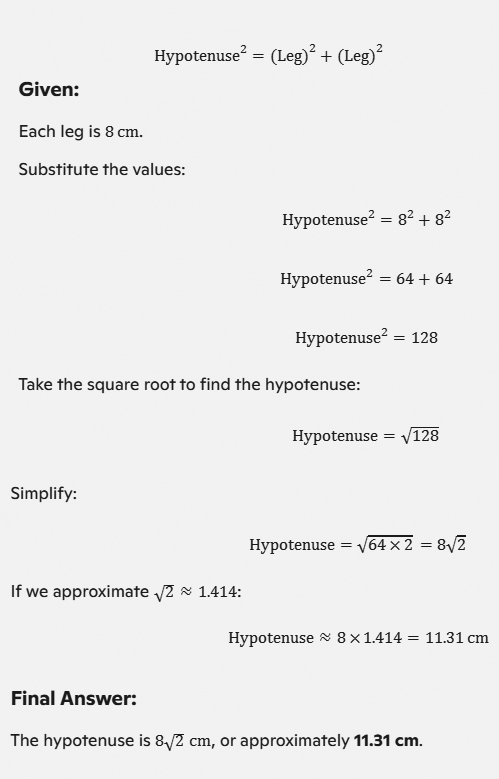
Q4.(b) Find the hypotenuse of the right isosceles triangle, each of whose leg is 8 cm.(10 Marks)

AIOU 248 Solved Assignment

Q5.(a) Show that the points A(6,1), B(2,7) and C(-6,7) are of a scalene triangle.(10 Marks)

AIOU 248 Solved Assignment

Q5.(b) Find the area of the rectangle 2 m long and 20 cm wide.(10 Marks)

AIOU 248 Solved Assignment

AIOU 248 Solved Assignment 1 Spring 2025
Share:

AIOU 248 Solved Assignment 1 Spring 2025

AIOU 248 Mathematics-II Solved Assignment 1 Spring 2025


AIOU 248 Assignment 1


Q1.(a) Find the continued product of(10 Marks)

AIOU 247 Solved Assignment

Q1.(b) A man is now 5 times as old as his son. Four years ago, the product of their age was 52. Find their present ages.(10 Marks)

AIOU 248 Solved Assignment

Q2.(a)(10 Marks)

AIOU 248 Solved Assignment

Q2.(b) Solve and make a graph (10 Marks)

AIOU 248 Solved Assignment

Q3.(a)(10 Marks)

AIOU 247 Solved Assignment

Q3.(b) Find the square root of the following x(x-1)(x-2)(x-3)+1(10 Marks)

AIOU 247 Solved Assignment

Q4.(a)(10 Marks)

AIOU 247 Solved Assignment

Q4.(b)(10 Marks)

AIOU 247 Solved Assignment

Q5.(a)(10 Marks)

AIOU 247 Solved Assignment

Q5.(b) The perimeter of a rectangle is 22cm and its area is 24cm. Calculate the length and breadth of the rectangle.(10 Marks)

AIOU 247 Solved Assignment

AIOU 248 Solved Assignment 2 Spring 2025
Share:

AIOU 221 Solved Assignment 2 Spring 2025

AIOU 221 Functional English-II Solved Assignment 2 Spring 2025


AIOU 221 Assignment 2

Q1. Listen to the recorded text 9 in Unit 4, and complete the following table with the relevant information about the three robbers.(15 Marks)

Physical Features and Appearance Robber 1 Robber 2 Robber 3
Age group Young, possibly in his 20s Early 30s Younger, in his early 20s
Height Over six feet (tall) Around 5 feet 6 or 7 inches Not clearly seen
Color and size of eyes Dark black, small Not mentioned Not mentioned
Hair color and style Light brown Long, tied at the back Nicely trimmed black hair
Dress Blue half-sleeve shirt, trousers Blue jeans, striped black and white T-shirt Shalwar kameez, waistcoat, dark sunglasses
Complexion Not mentioned Fair Not mentioned
Physique or built Strong built Slim Not mentioned
Facial features Masked Short black beard Black mustache

Q2. Read the chart given on page 69 of Unit 4 carefully and describe the following people.
Your Father, Your Mother, Your Friend, Your Teacher
(20 Marks)

Categories Father Mother Friend Teacher
Age Middle-aged Middle-aged Early 20s 40s
Build Average build Slim Athletic Slim
Height Tall Medium Medium Medium
Hair Colour Black Brown Dark Brown Grey
Hair Style Short Neatly tied Stylish Tied in a bun
Face Oval-shaped Round Square Oval
Prominent Features Thick eyebrows and glasses Dimples Small scar on cheek High cheekbones
Personality Friendly, responsible Loving, caring Outgoing, energetic Strict but understanding
Eyes Dark brown Light brown Bright blue Dark brown
Complexion Wheatish Fair Tan Wheatish
Dress Formal attire Elegant shalwar kameez Casual, jeans and T-shirt Professional formal wear

Q3. Unit 5 deals with ‘Using a Library’. Go to page 93 and write about the four important kinds of reference books. What importance does each book give?(10 Marks)

1) Dictionaries

A dictionary is essential for understanding the meanings, pronunciations, spellings, and usage of words. It provides information on parts of speech, etymology, and word origins. Dictionaries help improve language skills, expand vocabulary, and clarify grammar rules. They serve as a fundamental tool for language learners and writers.

Importance:
  • Boosts comprehension and communication.
  • Ensures accurate spelling and usage.
  • Aids in learning new words.

2) Encyclopedias

Encyclopedias compile information on a wide variety of topics and subjects. They contain summaries, explanations, and detailed articles, often arranged alphabetically, making them ideal for research and learning. Encyclopedias exist both as general ones (covering all subjects) and specialized versions (focusing on a particular field, e.g., science or history).

Importance:
  • Provides a starting point for research.
  • Summarizes complex topics.
  • Offers factual, reliable information.

3) Almanacs

Almanacs are annual publications packed with facts, figures, and statistics. They cover subjects like weather forecasts, historical timelines, sports records, population data, and geographic summaries. Almanacs are perfect for quickly accessing current or specific factual information.

Importance:
  • Offers up-to-date statistics and historical data.
  • Summarizes major trends and events.
  • Serves as a quick reference for facts.

4) Atlases

Atlases contain maps of varying scales and detail, showing countries, cities, states, regions, and continents. They may also include thematic maps, such as climate or population distribution. An atlas is an essential tool for geographic exploration, education, and planning.

Importance:
  • Provides geographic layouts and locations.
  • Helps understand political and physical features.
  • Useful for travel and study.

Q4. Read Unit 5 carefully and answer the following questions.(15 Marks)

1) What are the three good reasons to use a library?

1. Access to a vast collection of books and other learning materials for research, study, or leisure reading.

2. Availability of quiet spaces conducive to focus and learning, making it an ideal environment for productivity.

3. Access to valuable resources like reference books, computers, internet facilities, and guidance from librarians.

2) What are the two ways books are listed in the card catalog?

a. By Author: Arranged alphabetically by the author's last name, which helps readers locate books written by a specific author.

b. By Subject: Categorized according to the topic or theme, enabling readers to find books related to a particular subject.

c. By Title: Organized alphabetically by the book titles.

3) What is a call number?

A call number is a unique identifier assigned to each book or material in a library, which helps organize and locate it on library shelves. It's typically based on the Dewey Decimal System or another cataloging system. The call number acts as the "address" of the book in the library. For example, books on similar subjects will have call numbers that group them together, making it easier for readers to find them in the same section.

4) What are the main reasons to use a dictionary?

i) Understanding Word Meanings: Dictionaries provide definitions of words, helping you expand your vocabulary and understand unfamiliar terms.

ii) Correct Spelling: A dictionary helps ensure accurate spelling, which is crucial for clear written communication.

iii. Pronunciation Guidance: Most dictionaries provide phonetic transcriptions or audio features to show how to pronounce words correctly.

iv) Grammar and Usage: They specify the part of speech (noun, verb, adjective, etc.) and offer examples to illustrate proper usage.

v) Synonyms and Antonyms: Many dictionaries include synonyms and antonyms, which help improve word choice and writing style.

vi) Etymology: Advanced dictionaries provide information on word origins and how they've evolved over time, enhancing understanding of language history.

5) How is an Almanac different from an Encyclopedia?

Almanac

An almanac is a concise annual publication filled with facts, statistics, and records. It covers a wide range of topics, such as weather data, historical events, sports results, and population summaries. Almanacs are typically updated yearly, providing the latest information.

Key Features:

  • Contains current and time-sensitive data.
  • Provides brief summaries of major events or topics.
  • Acts as a quick reference guide.

Encyclopedia

An encyclopedia is a comprehensive reference work offering detailed articles and insights on diverse topics. It often spans multiple volumes and is organized alphabetically, making it ideal for in-depth research and learning.

Key Features:

  • Provides thorough and detailed information on topics.
  • Organized alphabetically for easy navigation.
  • Ideal for learning and research.

Q5. Unit 6 deals with ‘Using a Dictionary’. Go to page 108, exercise 5 where ‘Homonyms’ are explained. Homonyms have the same spelling, and same sounds but different meanings. Open your dictionary and write at least two different meanings of the following words.(10 Marks)

Spring:

  • A season of the year, following winter and preceding summer.
  • An elastic device or coil that returns to its original shape after being compressed.

Pole:

  • A long, slender cylindrical object, often made of wood or metal, used for support.
  • Either of the two ends of Earth's axis, the North Pole or South Pole.

Tire:

  • A rubber covering around a wheel to allow it to roll smoothly on roads.
  • To feel exhausted or physically drained.

Rose:

  • A type of fragrant flower known for its beauty and often symbolizing love.
  • Past tense of the verb "rise," meaning to ascend or increase.

Lie:

  • To recline or rest horizontally.
  • To make a false statement with intent to deceive.

Q6. Refer to Unit 6, page 104, some words are given in the box. Arrange all these words in alphabetical order.
Male Tale Take Jade Mail Safe Date Lake Sale Tail Nail Late Fate Hate Fail
(15 Marks)

Date, Fail, Fate, Hate, Jade, Lake, Late, Mail, Male, Nail, Safe, Sale, Take, Tale, Tail


7. Read the passage given in Unit 6, page 116. Search for those simpler words which mean almost the same as the difficult words written in bold. You would find the explanations or simpler words from within the text.(08 Marks)

  1. Share: Tell
  2. Enriching: Much more richer
  3. Awed: Nervous
  4. Rituals: Procedures
  5. Approached: Came closer
  6. Adoration: Great sense of love or respect
  7. Perspective: Outlook
  8. Drastic: Major

8. Refer back to Unit 6, exercise 16. Read the given words and write synonyms of each word.(07 Marks)

  1. Irrelevant: Unimportant
  2. Awful: Terrible
  3. Important: Significant
  4. Hurry: Rush
  5. Possess: Own
  6. Acquire: Obtain
  7. Execute: Perform


AIOU 221 Solved Assignment 1 Spring 2025
Share: